SPF lookup queries the authoritative DNS server for a domain, finds its
Sender Policy Framework
record, and resolves every include, a and mx term into the IP addresses that
are authorised to send email for the domain. Wirewiki does this live, with no caching, and counts each
lookup-triggering term against the SPF specification's hard limit of 10.
Enter a domain above to see the record, its validation issues, the full include tree, every authorised IP range, and the ASNs those ranges belong to.
How Wirewiki checks SPF records
Wirewiki resolves an SPF record the way a receiving mail server does: it walks every include,
a, mx and redirect term against live DNS, expands every ip4
and ip6 range, and adds the context a CLI tool can't.
- Live query of the authoritative DNS server. No caching layer between the domain's nameserver and what you see. A record change is visible immediately.
-
Every
includeandredirectis clickable. Drill down into nested SPF records all the way to the bottom of the tree, on any domain on the internet. - Counts of the IP addresses authorised. Including CIDR expansion to IPv4 and IPv6 totals, plus the ASN and organisation each range belongs to.
-
Mail providers detected by name. Common
include:targets like_spf.google.comorspf.protection.outlook.comare recognised and labelled. -
SPF history. Every domain Wirewiki archives keeps a record of changes, so you can see when
an
includewas added or the qualifier on the trailingallmechanism was changed. - No sign-up, no upsell. Wirewiki does not sell a managed SPF product. The tool is the product.
What is an SPF record?
An SPF record is a single line of text published in a domain's DNS that lists the mail servers allowed to send email for that domain. Receiving mail servers fetch this record while evaluating each incoming message. If the sending server's IP address is not authorised by the record, the message can be flagged, quarantined or rejected.
SPF records are stored as DNS TXT records (a dedicated SPF record type once existed but
was retired in
RFC 7208).
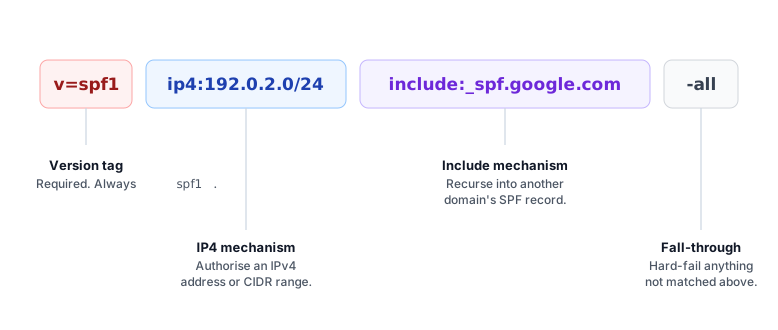
A valid SPF record starts with v=spf1. It usually finishes with an all mechanism or a
redirect modifier to declare a default for senders that nothing else matched — RFC 7208 does not
require either, but without one the result is neutral, which offers no protection against spoofing.
How an SPF check works
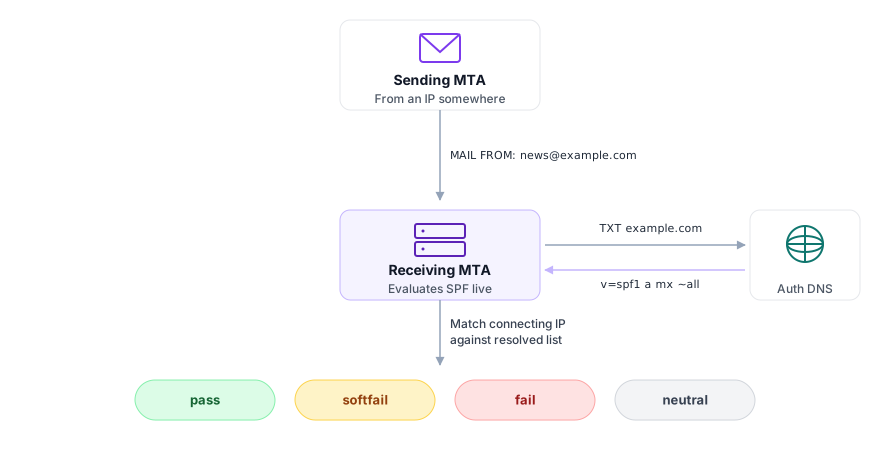
SPF authentication runs on the receiving mail server, not on the sender's side. When an email arrives, the
receiver looks up the SPF record of the SMTP envelope sender — the MAIL FROM address (often called
the Return-Path, since that's the header the receiver writes into the message from the same value once it
accepts delivery). RFC 7208 §2.3 also RECOMMENDS a separate SPF check on the HELO hostname the
sending server announced, which is the only identity SPF can authenticate when the envelope sender is empty
(such as a bounce message). The receiver then walks through the record left to right until a mechanism matches
the connecting IP address.
- The sending server greets with
HELO/EHLOand gives aMAIL FROMaddress. - The receiver extracts the domain part of
MAIL FROM(and, if it chooses, the HELO hostname), and runs an SPF check against each. - It queries DNS for that domain's
TXTrecords and finds the one starting withv=spf1— more than one is a permanent error. - It evaluates each term in order.
include,a,mx,exists,ptrandredirecttrigger additional DNS lookups. - The first matching mechanism's qualifier (
+,-,~,?) decides the result. - If nothing matches, the trailing
allmechanism is used as the fall-through.
Mechanisms, modifiers and qualifiers
An SPF record is built from three kinds of token. Mechanisms match the connecting IP, qualifiers prefix a mechanism to decide what happens when it matches, and modifiers change how the whole record is evaluated.
Mechanisms
| Mechanism | Triggers DNS lookup | Meaning |
|---|---|---|
ip4:address[/cidr]
|
No | Match if the sender is in this IPv4 address or range. |
ip6:address[/cidr]
|
No | Match if the sender is in this IPv6 address or range. |
a[:domain][/cidr]
|
Yes | Match if the sender appears in the A/AAAA records for the domain (defaults to the current domain). |
mx[:domain][/cidr]
|
Yes | Match if the sender's IP is the address of one of the domain's MX hosts. |
include:domain
|
Yes |
Recursively evaluate the SPF record of another domain. A pass makes this term match; fail, softfail and neutral make it not match and evaluation continues. Errors propagate — including the case where the target publishes no SPF record at all, which surfaces here as PermError.
|
exists:domain
|
Yes | Match if an A record exists for the supplied domain. Commonly used with macros for per-sender lookups. |
ptr[:domain]
|
Yes (often many) | Not recommended. RFC 7208 §5.5 says this mechanism SHOULD NOT be published due to its DNS cost and unreliability. |
all
|
No | Always matches. Belongs at the end of the record — anything after it is silently ignored. Combine with a qualifier to decide what to do with senders that nothing else matched. |
Qualifiers
| Qualifier | Name | Result on match |
|---|---|---|
+ (default)
|
Pass | Sender is authorised. |
-
|
Hard fail |
Sender is explicitly not authorised. Most receivers will reject the message outright. Risky for the trailing all when legitimate mail can be forwarded or relayed — see softfail vs hardfail.
|
~
|
Soft fail |
Sender probably isn't authorised. Receivers usually accept the mail but flag it as suspicious. The recommended default for the trailing all.
|
?
|
Neutral | No opinion. Equivalent to having no SPF policy at all for this sender. |
Modifiers
| Modifier | Meaning |
|---|---|
redirect=domain
|
Replace this record entirely with the SPF record of the named domain. Only one redirect is allowed (a second one causes PermError), and a target that doesn't publish an SPF record causes PermError too — not the none result you might expect. If an all mechanism is present anywhere in the record, the redirect is silently ignored, so combining the two is legal but pointless.
|
exp=domain
|
Names a domain whose TXT record supplies an explanation string returned whenever evaluation produces a fail (from any --qualified mechanism, not only -all). Rarely used.
|
Reading an SPF record: worked examples
v=spf1 ip4:198.51.100.10 -all
Only the mail server at 198.51.100.10 may send email for this domain. Everything else hard-fails.
Suitable for a single self-hosted mail server with no marketing or transactional providers.
v=spf1 ip4:192.0.2.0/24 -all
Authorises any IPv4 address in 192.0.2.0/24 — 256 addresses in total. Wirewiki will expand the CIDR
and show the start and end of the range along with the ASN of the network it belongs to.
v=spf1 include:_spf.google.com include:spf.protection.outlook.com ~all
Delegates authorisation to Google Workspace and Microsoft 365. The receiver evaluates each
include by running a fresh SPF check against the provider's record; if either returns
pass for the connecting IP, the corresponding include term matches here. (A
fail or softfail inside an include does not propagate — it just means the term
didn't match and evaluation moves on.) The trailing ~all soft-fails anything that doesn't match.
Two include mechanisms use two DNS lookups directly, but each of those records contains further
includes of its own — see the 10 DNS lookup limit below.
v=spf1 ip4:192.0.2.0/24 ip6:2001:db8::/32 include:mailgun.org ~all
A common shape for a small company: a few owned ranges plus one transactional sender. The trailing
~all softfails anything unmatched, leaving the policy decision to DMARC and avoiding rejection of
legitimate mail that is forwarded by mailing lists or alias services.
Softfail vs hardfail: prefer ~all over -all
The conventional advice is to start with ~all and "harden" to -all once the record is
stable. That guidance predates wide DMARC deployment, and there's now a reasonable case for treating
~all as the steady state rather than a stepping stone.
With an aligned DMARC reject policy in place, the security difference between ~all and
-all narrows sharply: DMARC enforces the policy on the visible From domain regardless of
whether SPF returns fail or softfail. Meanwhile -all breaks legitimate mail that is forwarded,
relayed between your own domains, or sent through services that don't rewrite the Return-Path — the connecting IP
no longer matches, SPF hard-fails, and some receivers reject the message before DKIM is even evaluated.
Practice is split.
Mailhardener
and a number of other deliverability specialists recommend leaving SPF at ~all and using DMARC for
enforcement; others still graduate to -all once they're confident of their sending sources. Either
is defensible with DMARC monitoring in place. -all remains the right choice for parked or
non-sending domains, where you want every receiver to reject anything purporting to come from the domain.
Common SPF errors and how to fix them
| Error | Cause | Fix |
|---|---|---|
| No SPF record found |
No TXT record starting with v=spf1 is published for the domain.
|
Publish a single TXT record like v=spf1 -all at minimum to declare that the domain sends no email, or add the authorised senders for the domain.
|
| Multiple SPF records found |
Two or more TXT records start with v=spf1. SPF treats this as a permanent error.
|
Merge them into a single record. Combine the mechanisms, deduplicate includes, and keep one trailing all.
|
| PermError: too many DNS lookups |
More than 10 mechanisms that trigger DNS lookups (include, a, mx, exists, ptr, or redirect).
|
Drop unused providers, replace include chains with direct ip4 / ip6 ranges where stable, or use SPF macros for highly variable senders.
|
| PermError: too many void lookups |
More than 2 DNS lookups during evaluation returned NXDOMAIN or empty answers. RFC 7208 §4.6.4 makes this limit a SHOULD rather than a MUST, but the larger mailbox providers enforce it.
|
Remove includes pointing at domains that no longer publish SPF records, and clean up a/mx mechanisms pointing at unused hostnames.
|
| TempError |
A DNS lookup during evaluation timed out or returned SERVFAIL.
|
Usually transient. If it persists, check the nameservers of an included domain — they may be misconfigured or unreachable. |
Missing all mechanism
|
The record has no fall-through. RFC 7208 treats this as neutral for unmatched senders, which offers no protection against spoofing.
|
Add a final ~all. With DMARC in place, ~all is the safer default; reserve -all for domains that should never send mail (see softfail vs hardfail above).
|
Use of +all or ?all
|
+all authorises every IP on the internet to send for the domain. ?all is neutral and gives no protection.
|
Replace with ~all.
|
ptr mechanism used
|
RFC 7208 §5.5 says ptr SHOULD NOT be published. Slow, unreliable, and ignored or penalised by some receivers.
|
Remove ptr. Replace with explicit ip4/ip6 ranges or an include.
|
| String longer than 255 characters | A single quoted TXT string exceeds the 255-byte limit. | Split the record into multiple shorter quoted strings within the same TXT record. Receivers concatenate them in order. |
The 10 DNS lookup limit
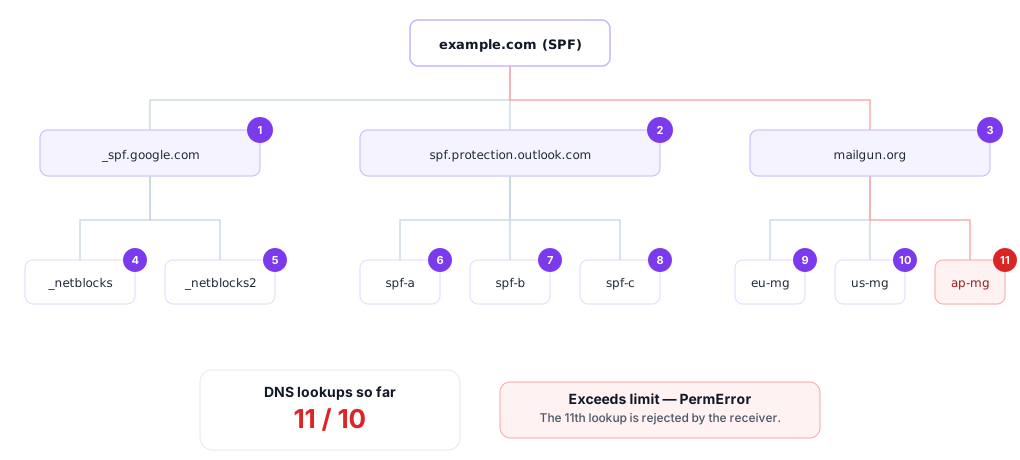
Every include, a, mx, exists, ptr and
redirect counts one against this budget, including the ones inside an included record.
RFC 7208 caps the total at 10. Exceed it and the receiver returns
PermError, which most platforms treat the same as a hard fail. ip4, ip6
and all trigger no lookup and don't count.
A separate cap of 10 A/AAAA lookups applies inside each mx and ptr mechanism, for
the hosts it resolves. An mx against a domain with 11 or more MX hosts can PermError
on that limit alone, without ever exceeding the global 10.
Wirewiki shows the running lookup count out of 10 on every SPF results page. If the budget is close to or over the limit, the page lists the issue along with the include tree so you can see exactly which provider is using the most lookups.
Check SPF from the command line
SPF records are plain TXT records, so any DNS tool can read them. Three quick commands:
dig +short TXT example.comnslookup -type=TXT example.comResolve-DnsName -Type TXT example.com
These commands show only the raw record. They don't expand include chains, count DNS lookups against
the limit of 10, or warn about issues like deprecated ptr mechanisms — that's what a tool like
Wirewiki adds on top.
How SPF fits with DKIM and DMARC
SPF on its own no longer guarantees inbox placement. Gmail, Yahoo, Microsoft and Apple all now require senders of any meaningful volume to publish SPF and DKIM and DMARC, with DMARC alignment passing on at least one of them. The three protocols answer different questions:
| Protocol | What it authenticates | Where it lives |
|---|---|---|
| SPF |
The connecting mail server (by IP) is allowed to send for the SMTP envelope sender's domain (the MAIL FROM), and optionally the HELO hostname.
|
TXT record at the domain. |
| DKIM | The message body and headers were signed by a key controlled by the signing domain. |
TXT record at <selector>._domainkey.<domain>.
|
| DMARC | The visible From domain aligns with an authenticated SPF or DKIM identity, and tells receivers what to do when it doesn't. |
TXT record at _dmarc.<domain>.
|
DMARC alignment has two modes, set per protocol with aspf= and adkim= on the DMARC
record. Relaxed (the default) requires the SPF or DKIM domain to share the same Organizational
Domain as the visible From — so bounces.mailer.example.com aligns with example.com.
Strict requires an exact match — the subdomains must be identical. Most senders use relaxed for
both; strict is mainly useful when you want to lock alignment to a specific subdomain.
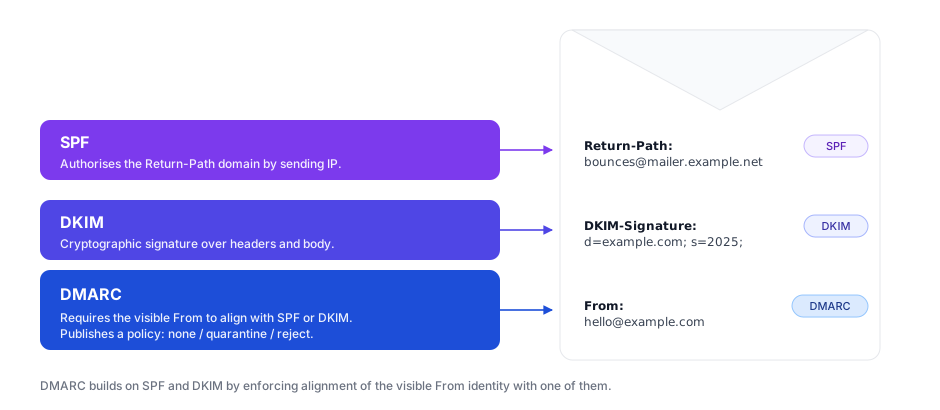
A common gotcha: SPF checks the SMTP MAIL FROM domain (what later becomes the Return-Path header on
the delivered message), which is often a bounce subdomain controlled by your email provider (e.g.
bounces.mailer.example.net). The address the recipient actually sees lives in the From
header — a different field entirely. DMARC bridges the two by requiring alignment, which is why an SPF pass
alone is no longer sufficient against modern phishing.
Should I flatten my SPF record?
SPF flattening replaces include mechanisms with the IP ranges they currently resolve to, collapsing
the DNS lookup count toward zero. It removes PermError in the short term but the trade-offs are real:
-
Stale authorisations (manual flattening). A hand-flattened record goes out of date the moment
your provider rotates IPs. Managed flatteners (AutoSPF, PowerDMARC's macro flattener, Scott Kitterman's
spfwatch) refresh the resolved ranges automatically, which solves the freshness problem at the cost of a permanent dependency on a third party. - Over-authorisation. Flatteners typically include the provider's full sending IP space, which is much broader than what your specific account actually sends from.
Wirewiki's recommendation: prefer trimming over flattening. The 10-lookup budget is usually enough for two or
three mail providers plus a couple of ip4 mechanisms. If you can't fit, drop the providers you no
longer send from, or use a subdomain per provider so each subdomain has its own budget.
SPF history
Wirewiki archives DNS records for many domains. On the SPF results page for an archived domain, you can step
through historical records and see when includes were added or removed, when the qualifier on
the trailing all mechanism was changed, or when the record was published for the first time.
Visit the DNS history tool to look up changes to any archived domain.
Frequently asked questions
Can a domain have more than one SPF record?
No. RFC 7208 requires exactly one record starting with v=spf1. Multiple records cause a
PermError and receivers treat that the same as a hard fail. Merge them into one.
What is the 10 DNS lookup limit?
The maximum number of lookup-triggering terms a receiver will accept while evaluating an SPF record. The
terms that consume the budget are include, a, mx, exists,
ptr and redirect. Exceeding the limit returns
PermError.
What is the difference between ~all and -all?
Both signal that an unmatched sender is not authorised. ~all (soft fail) asks the receiver to
accept the message but flag it as suspicious. -all (hard fail) tells the receiver to reject it.
With DMARC widely deployed, the older advice to "graduate" from ~all to -all is
no longer the obvious default. DMARC handles enforcement on the visible From domain, while
-all can break legitimate mail that has been forwarded or relayed. Many senders now leave SPF
at ~all and rely on DMARC for policy. See the
softfail vs hardfail section for the full reasoning.
My SPF passes but my mail still goes to spam. Why?
SPF is one signal among many. Common reasons for spam placement even with a passing SPF:
- No DKIM signature, or DKIM that fails.
- A DMARC policy of
quarantineorrejectwith neither SPF nor DKIM aligned with the visible From domain. - Poor sending IP or domain reputation.
- Content or engagement signals (high complaint rate, low open rate).
Does SPF check the visible From address?
No. SPF authenticates the SMTP envelope sender (MAIL FROM, which the receiver later records as
the Return-Path header), and optionally the HELO hostname. The visible From header that
recipients see is not checked by SPF at all. Closing that gap is what DMARC alignment was designed for.
What's an SPF PermError?
A permanent error during evaluation: too many DNS lookups, too many void lookups, a syntax error, or
multiple records. Receivers cannot recover from PermError on retry, so the result is final and
almost always treated as a fail.
What's an SPF TempError?
A temporary error during evaluation, usually caused by a DNS timeout or SERVFAIL on a lookup.
Receivers may retry the message later. If it keeps happening, the nameservers of an included domain are
probably unhealthy.
Is the dedicated SPF DNS record type still used?
No. RFC 7208 obsoleted the SPF (type 99) DNS record in 2014. Publish the record as a TXT record
only. Wirewiki queries TXT and parses the v=spf1 prefix.
Other DNS record lookups
SPF is just one of many DNS record types. Use any of the lookups below to query the authoritative DNS server for a domain. Each tool returns live results — no caching, no delay between a DNS change and what Wirewiki shows.
- A lookup — IPv4 addresses
- AAAA lookup — IPv6 addresses
- AFSDB lookup — AFS database locations
- CNAME lookup — The canonical DNS name
- DNAME lookup — Delegation names
- HINFO lookup — Host information
- IXFR lookup — Incremental zone transfers
- KEY lookup — Cryptographic keys for DNSSEC
- MX lookup — Mail servers
- NS lookup — Name servers
- PTR lookup — Canonical name pointers
- RP lookup — Responsible people
- SIG lookup — DNSSEC signatures
- SOA lookup — The start of authority record
- SRV lookup — Service locators
- TXT lookup — DNS text records
DNS lookup shows all common record types at once. The full list of supported record types — including DNSSEC, service binding, and obscure historical types — is available via the lookups above.